Side-by-side scripture
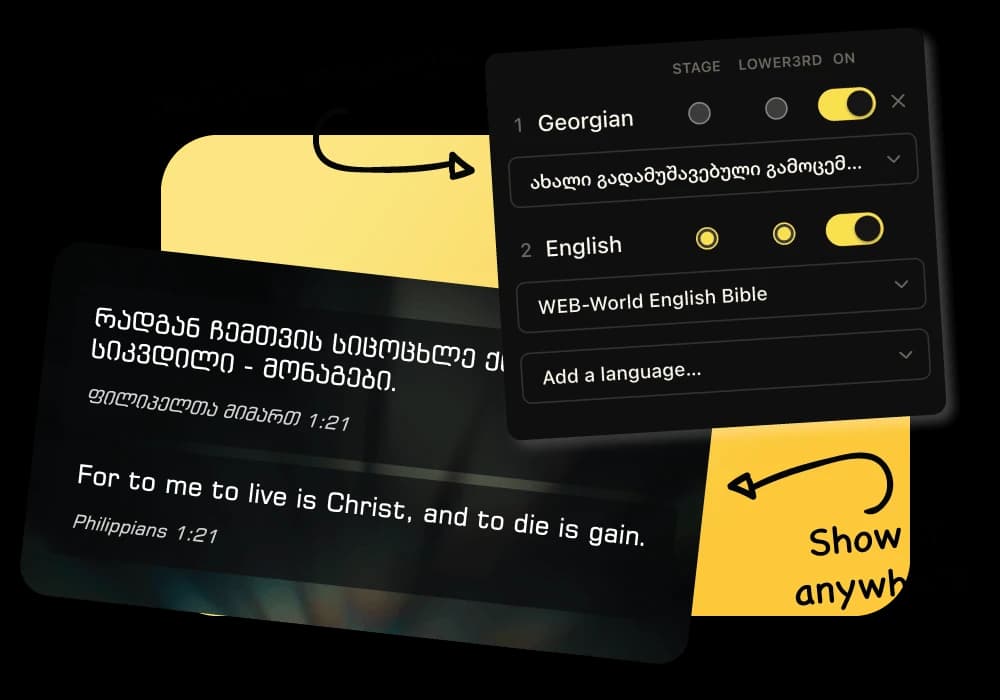
Display two Bible translations on the same slide and keep the verse reference connected to both.
Bilingual church presentation software
Put both languages on the same slide, keep them in sync, and choose what the congregation, worship team, and online audience see. LlamaPresenter is built for bilingual services that should not require twice the preparation.
In a bilingual church, the translation work is important, but the repetitive slide work is not. Teams often keep two copies of every reading and song, then spend time fixing line breaks whenever one version changes.
LlamaPresenter keeps both languages attached to the same piece of content. Search for a Bible passage once and display both translations. Add two lyric versions to a song and move through one shared arrangement. Your operator controls one service instead of switching between two decks.
You can also treat each audience differently. The main projector may show both languages, the stage display may show the worship team only one, and the livestream can use the language most useful to viewers at home.
Display two Bible translations on the same slide and keep the verse reference connected to both.
Save both lyric versions with the song. Arrange the song once, even when the congregation sings in both languages.
Use a bilingual projector while the stage display or lower third carries one language. Each output has its own settings.
Create layouts for longer bilingual text, then reuse them across scripture and songs instead of formatting every slide by hand.
Add the Bible versions and lyric languages your church uses.
Set the font, spacing, alignment, and background for clear two-language slides.
Keep readings, songs, announcements, and media together in service order.
Advance both languages together from the computer or phone remote.
Yes. You can pair English and Spanish, or any other translations available in your account, on the same slide.
No. Both languages belong to the same service and move together as the operator changes slides.
Yes. Set the stage display to one language while the congregation sees both on the projector.
Yes. The Free plan runs in a browser and includes the core presentation tools. Pro raises the limits and includes the desktop app.
Start with the browser-based Free plan. Upgrade to Pro for higher limits and the included Mac and Windows desktop app.