Run the service from your phone
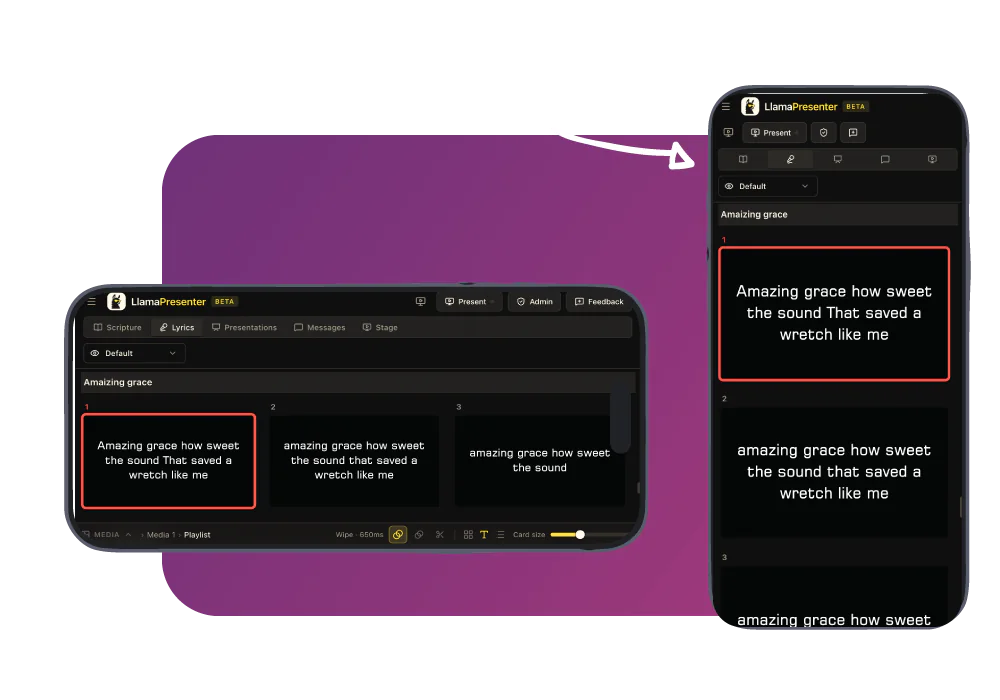
Open the console in your phone browser to search passages, move through songs, and control slides from anywhere you can sign in.
How LlamaPresenter helps
Open the console in your browser
Sign in on your phone to see the service order, search, and slide controls.
Change slides from anywhere in the room
Control the live service while you lead, teach, or help from the back of the room.
Share control with another operator
A phone and laptop can open the same service and see the live slide.
Search verses and manage the timer
Use the phone for Bible passages, songs, countdowns, and speaker name cards.
See it in the console
Add a Bible translation
Add the Bible versions you need and display them together on the same slide. Switch languages without stopping your service.
Adding a translation from the archive inside the console, and picking it in the language picker
How to use it
- Open LlamaPresenter on your phone and sign in.
- Open the service you want to control.
- Search, send, and clear content from your phone.
- Hand over control by letting another team member sign in on their device.
Questions
Do I need to install an app?
No. The console is a web page, so any modern phone browser is the remote. There is nothing to install and nothing to pair.
Does the phone need to be on church Wi-Fi?
No. As long as the phone can access LlamaPresenter, you can use it to control the service.
Can two people control the same service?
Yes. Multiple devices can access the same service and stay in sync.
Explore related features
Stage display
Show the current slide, next slide, clock, and timer on a screen your team can see.
Service timing
Keep your service on schedule with countdowns, a running order, and clear timing for your team.
Worship song lyrics
Organize songs, set their order, and show lyrics on every screen.
Find more examples on the use cases page, and the comparison puts LlamaPresenter beside ProPresenter, EasyWorship, FreeShow and Proclaim.
Try it this Sunday
Start with the free browser app. Pro adds the desktop app and higher limits.
No credit card required