Another room is another link
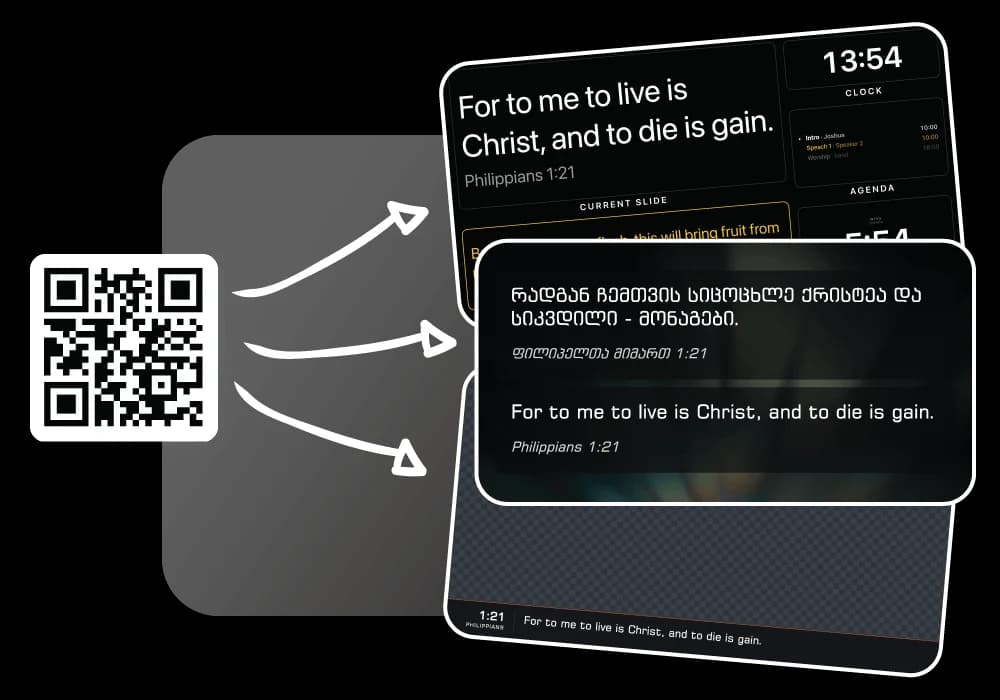
The second room is usually solved with a cable, a splitter and somebody who understands both. Here it is solved with a URL: whoever is in that room opens it, and the slide arrives.
What usually goes wrong
- The overflow room needs the same slide, and the cable does not reach.
- Every additional screen is another licensed machine.
- The foyer and the crèche end up on a photo of last week’s notices.
What answers it
A screen per room, at no cost
Each room opens the projector link on whatever is plugged into its screen. There is no seat to buy and nothing to install.
The same live slide
Every output follows the same session, so the overflow room is never a beat behind the main one.
Rooms can differ where it matters
The languages and the template are set per output, so a room can carry what its congregation reads.
Run it from anywhere in the building
The console is a page. So is the remote. Neither is tied to the machine in the main auditorium.
How a Sunday runs
- Open the projector link in each room that needs the slide.
- Set the languages and the look each of them carries.
- Run the service once, from the console or a phone.
- Add a room mid-service by opening the link on one more screen.
What a church like this uses
The jobs behind the sections above, each with a page of its own.
Questions
Is there a limit on the number of screens?
The outputs are links, so a screen is not a seat. What your plan counts is your library and languages, not the rooms you open them in.
Can each room show a different language?
Yes. Every output picks the languages it carries from the same live slide.
Do the rooms need to be in the same building?
No. An output is a link, so a second campus opens it exactly as the room next door does.
Churches like yours
Online church
Verses, lyrics and name cards over the stream, without a capture card.
Volunteer teams
Whoever is in the booth signs in. Nothing to install, one version for everybody.
Every kind of church is on the solutions page, and the pricing page has what the free plan holds before Pro is worth it.
Try it on this Sunday
Nothing to install, a free plan that is not a countdown, and every screen a link.
No credit card required