Run church media from one console
Show Bible verses, lyrics, and announcements on the projector. Give the team a stage view and add graphics to the livestream from the same console.
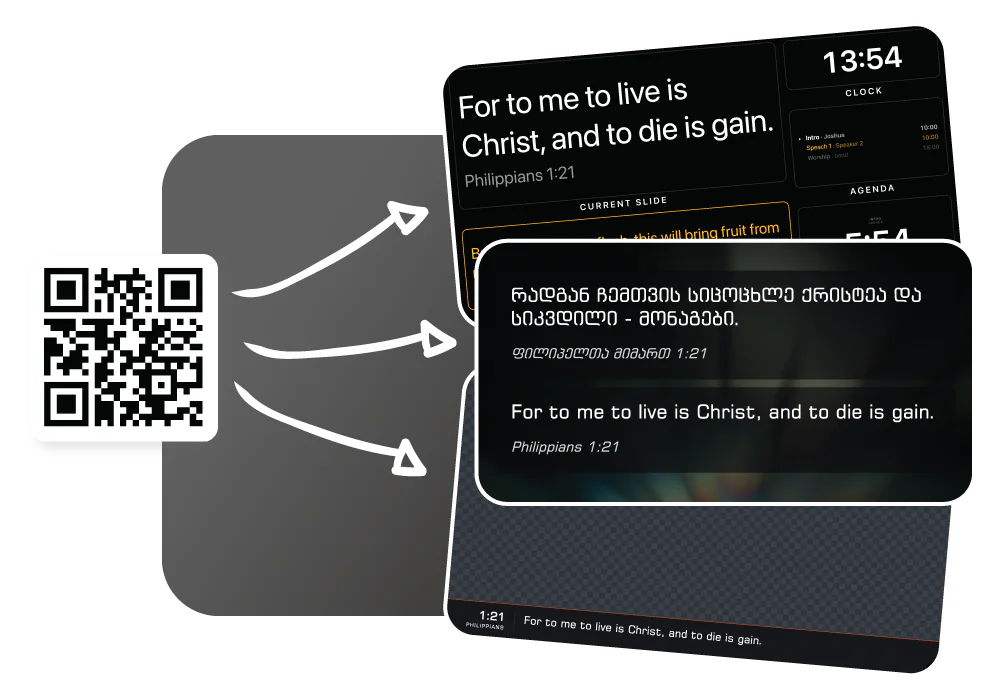
How LlamaPresenter helps
Keep service content in one place
Prepare Bible verses, songs, announcements, and speaker name cards in one console.
Show content on screens and streams
Use separate views for the projector, stage display, and livestream.
Choose how each screen looks
Set fonts, text sizes, and backgrounds for the projector and stream.
Organize images and music
Keep background pictures in folders. Pro also lets you play your own audio tracks during the service.
See it in the console
Add a Bible translation
Add the Bible versions you need and display them together on the same slide. Switch languages without stopping your service.
Adding a translation from the archive inside the console, and picking it in the language picker
How to use it
- Set up your church media library: backgrounds, folders and audio tracks.
- Design your template once in the editor.
- Open the projector, stage and livestream links on the screens that need them.
- Run the service. Verses, lyrics, and announcements reach every screen together.
Questions
What counts as church media in LlamaPresenter?
Bible verses, song lyrics, announcement slides, background images, and audio tracks are organized in one media library and run from the same console as the projector, stage and livestream outputs.
Can I show our service on a TV as well as stream it online?
Yes. Every output is a link, so the same content reaches a smart TV, a laptop or a browser source, whichever your church media setup needs. A physical screen and an online stream can run together.
Does LlamaPresenter store our media?
No. Images and audio stay on the computer that added them, and only the metadata is saved online. A projector elsewhere fetches the file directly from that machine.
Is this different from church multimedia software like ProPresenter?
It covers the core jobs: verses, lyrics, backgrounds, stage displays, and livestream graphics. You can start free, and Pro includes the desktop app.
Explore related features
Livestream graphics
Show Bible verses, lyrics, and lower thirds directly over your church livestream.
Motion graphics & templates
Show Bible verses and lyrics over motion backgrounds in your livestream.
Worship song lyrics
Organize songs, set their order, and show lyrics on every screen.
Find more examples on the use cases page, and the comparison puts LlamaPresenter beside ProPresenter, EasyWorship, FreeShow and Proclaim.
Try it this Sunday
Start with the free browser app. Pro adds the desktop app and higher limits.
No credit card required