Current and next slide
Help speakers and musicians follow the presentation without turning toward the projector behind them.
Church stage display software
Show the current slide, what comes next, the time, and the service countdown on one clear confidence monitor. Stage View stays connected to the same presentation running the projector and livestream.
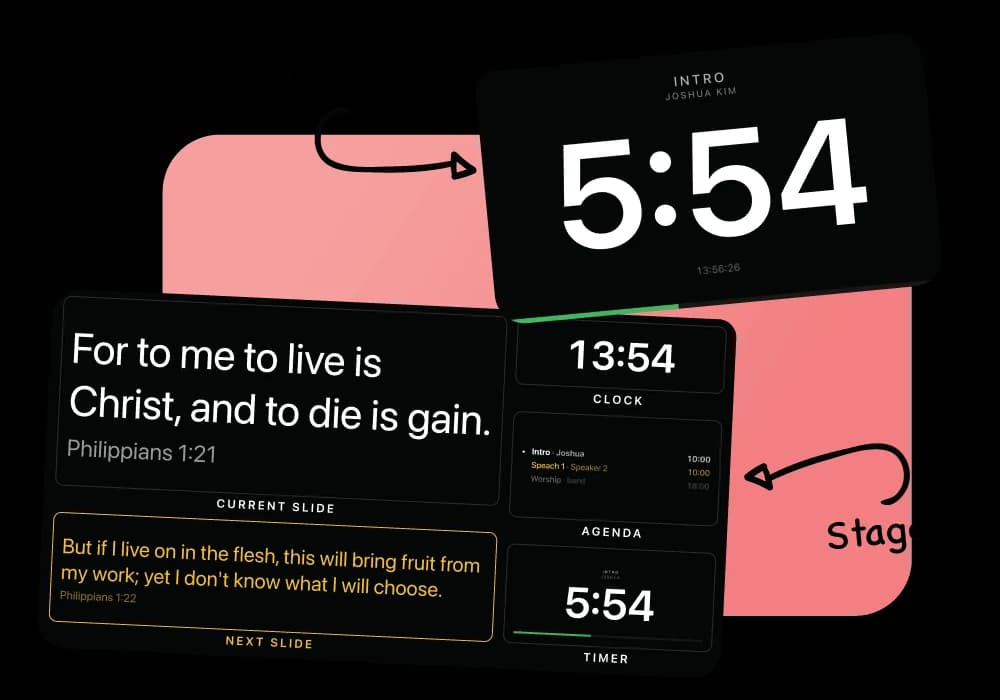
A useful stage display answers a few questions immediately. What is on the main screen? What comes next? How much time is left? The speaker or worship leader should not have to turn around or signal the booth for an answer.
LlamaPresenter Stage View follows the live presentation and shows the current slide beside the next one. Add a clock and countdown so everyone on the platform can keep the service moving without another timer system.
The display opens on a dedicated screen, laptop, tablet, or compatible smart TV. Choose the language your team needs, even when the congregation or livestream is reading something different.
Help speakers and musicians follow the presentation without turning toward the projector behind them.
Keep the service on time with a live clock and an adjustable countdown shown beside the presentation content.
Choose the language shown on Stage View independently from the projector and livestream outputs.
Open Stage View on a spare laptop, tablet, smart TV, or another display connected to a browser-capable device.
Use the stage link on the screen facing your pastor, musicians, or production team.
Set the stage language and show the current slide, next slide, clock, and timer.
Stage View follows every change made from the console or phone remote.
Add or remove time during a segment and keep the updated countdown visible to the platform.
A church stage display, sometimes called a confidence monitor, faces the platform and shows useful information such as the current slide, next slide, clock, and countdown.
Yes. Open the Stage View link in Safari on the iPad and place it where the speaker or worship team can see it.
Yes. Stage View can use a different language from the projector or livestream.
Yes. The timer also has its own output for a screen that should show the countdown without slide content.
Start with the browser-based Free plan. Upgrade to Pro for higher limits and the included Mac and Windows desktop app.