A church stage display, with everything your team needs
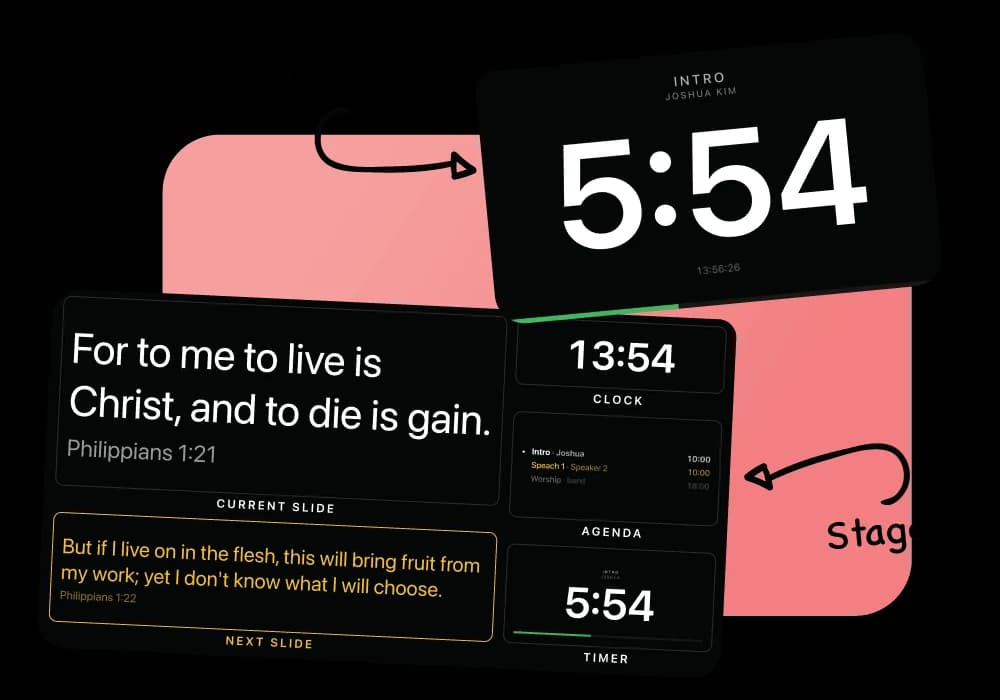
The person preaching needs three things: what is on the wall, what is coming, and how long is left. The stage view is those three, on a screen that costs whatever an old laptop costs.
What you get
See what is on now and what comes next
Show the current slide and the next one so speakers can stay focused on the service.
Keep an eye on the time
See the current time and the countdown for the service segment in one view.
Open it on any screen
It is a link. Open it on a smart TV, a spare laptop or a tablet - there is no cable to the booth and nothing installed on it.
Works on an iPad
No app to install. Open a browser on the iPad, paste your room's Stage View link, and it is ready for the stage.
Choose the stage language
Show the language your team needs while the congregation sees its own language.
See it in the console
Multiple Bible translations.
Add the Bible versions you need and display them together on the same slide. Switch languages without stopping your service.
Adding a translation from the archive inside the console, and picking it in the language picker
How a Sunday runs
- Open the Stage View link on the screen your team uses.
- Choose the language and information your team wants to see.
- Run the service from the console and Stage View stays in sync.
- Start a countdown when a segment begins and your team sees it immediately.
Questions
What hardware does the stage screen need?
Any device with a modern browser can display Stage View, including a smart TV, laptop, or tablet.
Can we use an iPad as the stage screen?
Yes. It is web based, so an iPad works with nothing to install - open Safari and paste your room's Stage View link.
Can we have more than one stage screen?
Yes. You can open the Stage View link on multiple screens.
Can the stage screen carry a countdown?
Yes. The church stage display countdown timer sits beside the current slide and what is next, and it has a link of its own for a screen that should show only the clock.
Is there a timer-only screen?
Yes. The timer has its own link for a display that shows only the countdown.
Nearby
Service timing
Keep your service on schedule with countdowns, a running order, and clear timing for your team.
Worship song lyrics
Keep your song library organized, build your running order, and put lyrics on screen when you need them.
Lower thirds
Show speaker names and roles over your livestream, then clear them automatically.
Every use case is on the use cases page, and the comparison puts LlamaPresenter beside ProPresenter, EasyWorship, FreeShow and Proclaim.
Try it on this Sunday
Nothing to install, a free plan that is not a countdown, and every screen a link.
No credit card required